1. Title and front matter
1.1. Download PDF and make sure it opens.
1.2. Check that PDF title and front matter (i.e. author list, affiliations, author notes, correspondence, keywords, abbreviations and dates) match corresponding HTML elements.
1.3. Check that PDF abstract section contents match HTML abstract.
2. Copyright statement
2.1. Check that copyright statement has the following format:
2.2. Check that LastName matches last name of the first author in the Author List.
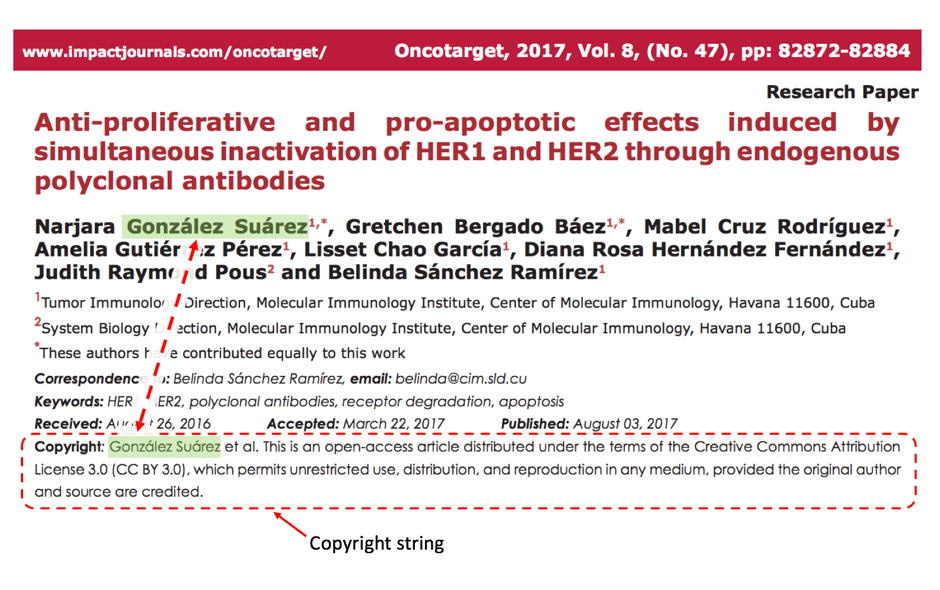
Attention
Gonzales Suares on the screenshot above is a compound surname. Please make sure that full surname is listed in the Copyright statement, rather than just last bit.
2.3. Check that there is et al. after LastName.
Exception: If article is written by 1 or 2 authors (i.e. Auhtor list contains just 1 or 2 authors), then et al. is not required.
2.4. Check that copyright statement text exactly matches the following:
This is an open-access article distributed under the terms of the Creative Commons Attribution License 3.0 (CC BY 3.0), which permits unrestricted use, distribution, and reproduction in any medium, provided the original author and source are credited.
3. Article text
3.1. Go through the text and check whether use of font size is consistent through the article, whether all sections, figures, tables and references which are present in HTML are also present in PDF.