1. Title
1.1. Check that title is in sentence case.
1.2. Check title spelling.
1.3. Check that capitalisation of scientific terms is correct. We suggest the you use the following procedure, if in you are in doubt regarding this or that term.
1.4. Check that following Latin terms are written in italics: in vivo, in vitro, in utero, in situ, via. For other Latin terms and gene names either italics or plain text is acceptable.
1.5. Check that PDF title matches HTML title.
2. Author List
2.1. Check that all author names in author list are separated by commas (,). Last two author names in the list can be separated by “and” instead of comma (,). No other separators allowed.
2.2. Check that there is no period (or any other punctuation mark) after the last author name.
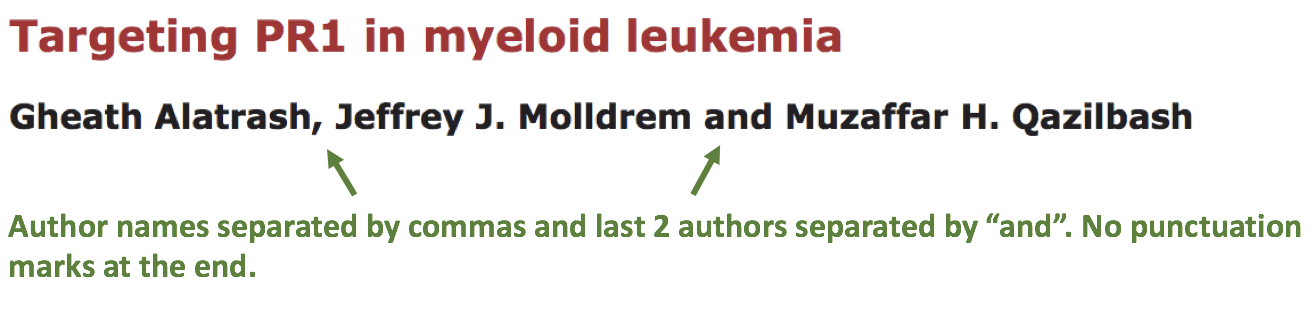
2.3. Check the format of the author name.
Allowed formats:
- FirstName LastName
- FirstName MN. LastName (MN. are initials of middle names; up to 4 letters)
- FirstName M.N. LastName (M.N. are initials of middle names; up to 4 letters)
- F. MiddleName LastName (F. is an initial of first name)
- F. MiddleName MiddleName LastName (F. is initial of first name and there can any number of middle names)
Please note that last names can be compound, can have prepositions, suffixes, prefixes or be mononyms. For example:
- Compound last names: Garcia-Closas, Gomez Jimenez
- Last name related prepositions: Van den Brandt, van der Ent
- Suffixes: Williams 3rd, Rowland Jr
- Prefixes: McCann, O’Kelly
- Mononym: Govindjee
Important
LastName cannot be presented as initial (even if authors insist on this). LastName should always be presented in full.
If you see that author name does not comply to these standards, please contact corresponding author and ask to provide author name in correct format.
2.4. Check that author names in PDF match author names in HTML.
3. Reference to article (News only)
3.1. Check that reference to article is located below author list.
3.2. Check the format of the reference line:
- Check that reference line contains the following elements:
News on: <Title of the reference article> by <first author Last Name of reference article> et al. Oncotarget. Year; Vol: Pages. DOI
OR in case of Ahead of print articles:
News on: <Title of the reference article> by <first author Last Name of reference article> et al. Oncotarget. Year Month Day. DOI [Epub ahead of print]
- Check that “News on:” is formatted in bold italics and colored in black.
- Check that “Title of reference article” is followed by “by” and “first author Last Name of reference article”. If there are more then 3 authors in reference article, than first author Last Name should be followed by “et al.” If article is written by 1 or 2 authors, then “et al.” is not required.
- Check that first author (or first author et al.) is followed by “Oncotarget.”
3.2.1. “Regular” articles:
Check that “Oncotarget.” is followed by Year (4 digits, e.g. “2017”). Year should be presented in full (4 digits) and should be followed by semicolon (;). There can be a space after semicolon (but this is not mandatory).
Check that year is followed by Volume. Volume should be one or more digits and should be followed by colon (:). There can be a space after semicolon (not mandatory, but consistency should be maintained).
Check that Volume is followed by Page numbers. Page numbers can be in either in short (12063-74) of full (12063-12074) format and should be followed by period (.). There should be a space after period.
DOI should be present and it should not contain spaces. There are 2 allowed formats of doi:
doi: … (e.g. doi: 10.1177/1947601910396213.)DOI can be followed by period (but this is not mandatory).
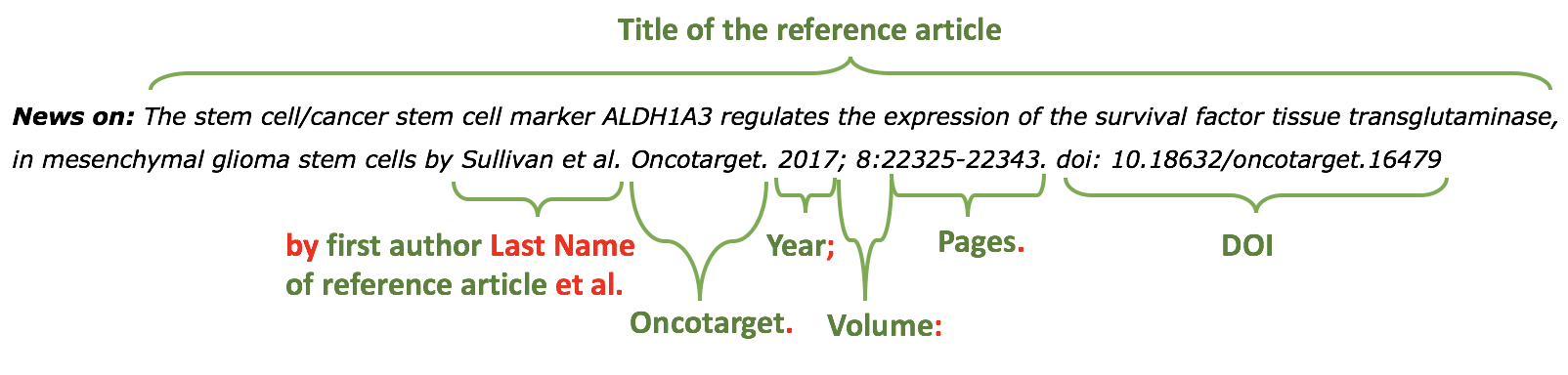
3.2.2. Ahead of print articles:
Check that “Oncotarget.” is followed by Year (4 digits, e.g. “2017”). Year should be presented in full (4 digits) and should be followed by semicolon (;). There can be a space after semicolon (not mandatory, but consistency should be maintained).
Check that Year is followed by Month. Month should be written in abbreviated form in accordance with journal style.
Check that Month is followed by Day (2 digits). Note that single Day digits should be preceded by 0 (zero). Day should be followed by period (.). There should be a space after period.
DOI should be present and it should not contain spaces. There are 2 allowed formats of doi:
doi: … (e.g. doi: 10.1177/1947601910396213.)DOI should be followed by period (.) and space.
[Epub ahead of print] should follow doi. There can be a period after [Epub ahead of print] (but it is not mandatory).
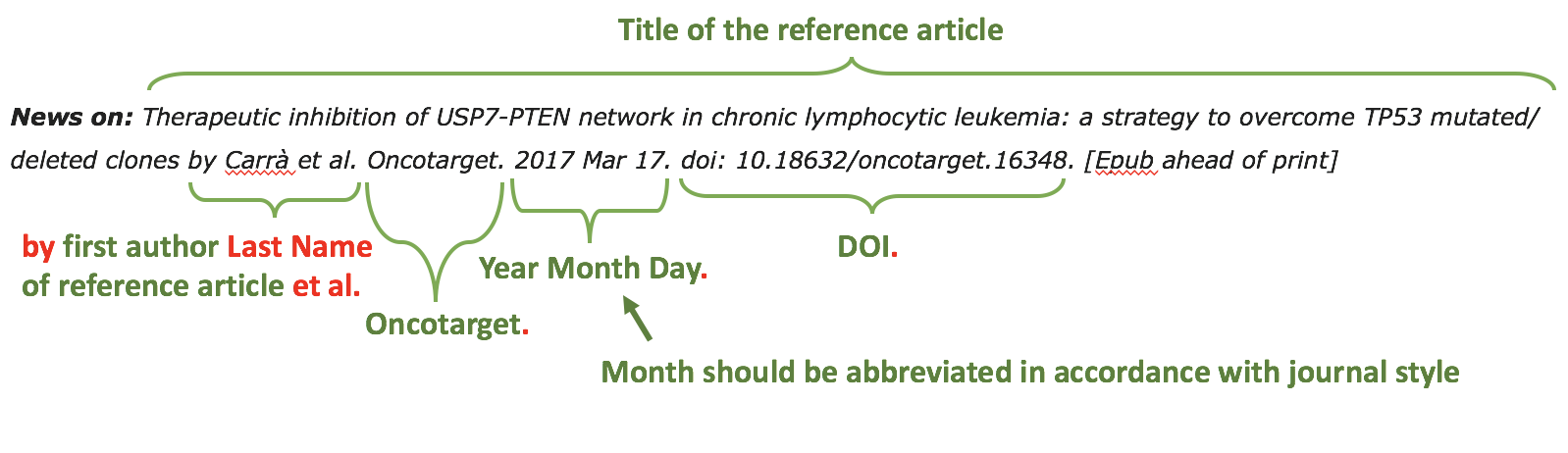
4. Affiliation text
4.1. Check that affiliation line contains the following elements:
Corresponding author name: affiliation text.
- Check that corresponding author name is underlined and followed by colon (:).

4.2. Check the format of the affiliation text. Authors are free to provide affiliation texts having any elements (e.g. University, School, Department, Lab, Hospital, etc) in any sequence they like. However certain rules apply to affiliation texts:
- Check that affiliation text contains at least department/division/lab/school and institution.
Note that there can be affiliations for non-academic institutions (such as companies). In such cases, “institution” part of affiliation text should contain just a company name.
- Check that NO street addresses and house numbers are included in affiliation texts.
- Check that both country and city names are present in affiliation texts.
- Check that country and city names are NOT written in all CAPS (capital letters).
- Check USA states. Both full names and abbreviations (two capital letters) are allowed.
- Check zip codes. Zip codes are optional element of affiliation texts. In rare cases when there are several affiliations, if one of affiliation texts does not have zip code, then remove zip code from all texts.
- Check that only commas are used to separate parts of affiliation text. In rare cases there can be several affiliations for the author. In this case those affiliations should be separated by semicolon (;).
5. Correspondence
5.1. Check that correspondence line contains the following elements:
Correspondence to: Correspondence author Full Name, email email@address.com
- Check that “Correspondence to:” and “email” words are formatted in bold italics and colored in black.

5.2. Check that name of author in correspondence line fully matches name in author list (it should be exact match, i.e. middle name initials should also match, if present).
5.3. In rare cases when there are several corresponding authors, there can be several correspondence lines.
6. Keywords
6.1. Check that keywords line contains the following elements:
Keywords: keyword1, keyword2, keyword3, keyword4, keyword5ORKeywords: keyword1; keyword2; keyword3; keyword4; keyword5
- Check that “Keywords:” word is formatted in bold italics and colored in black.
6.2. Check the format of the keywords line:
- Check that keywords are written in lower case, unless proper nouns. Check that capitalisation of scientific terms is correct. We suggest the you use the following procedure, if in you are in doubt regarding this or that term.
- Check that keywords are separated either by comma (,) or semicolon (;). However use of separators should be consistent: either all keywords are separated by comma or by semicolon. Separators cannot be mixed.
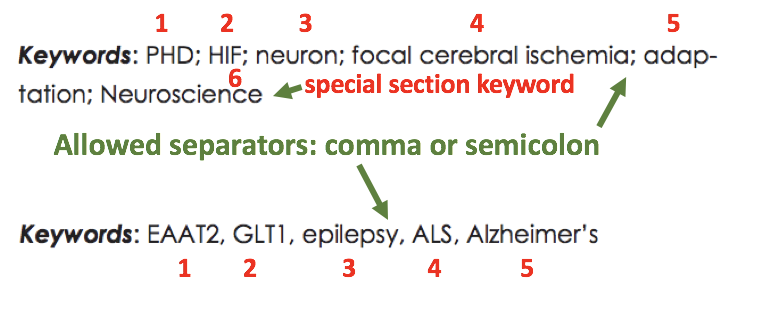
- Check that article has at least 1 and not more than 5 keywords.
- Have a look at TOC Section Title to check whether article belongs to Special section. If Section Title contains any of the words in “Special Section” column of the table below, then it belongs to the Special Section.
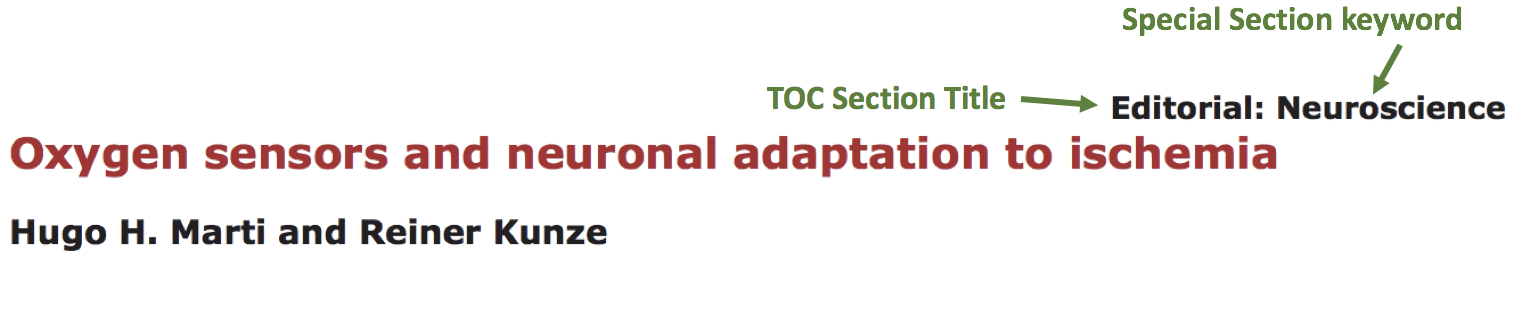
If article belongs to Special Section, then in addition to 5 general keywords article must have ALL special-section-related keywords. Corresponding keywords you can find in the table below.
Special Section Keywords Pathology Pathology Chromosome Chromosome Gerotarget (Focus on Aging) Gerotarget Autophagy Autophagy Neuroscience Neuroscience Immunology Immunology
- Check that there are no punctuation marks at the end of keywords line.
7. Dates
7.1. Check that there are 2 date lines - “Received:” and “Published:” - having the following format:
Received: Month Day, YearPublished: Month Day, Year
- Check that Month is spelled out, and Day and Year are presented as digits. Note that single Day digits should be preceded by 0 (zero).
Example:June 02, 2017August 29, 2016
- Check that there is a comma (,) between Day and Year.
- Check the spelling of the month.
- Check that dates are written in italics.

- Check that Received date is older than Published date (i.e. we cannot publish before we receive).
8. References
Please note that references in Editorials/News do not have article title component.
Reference consists of the following elements:
Author list. Citation Data. (i.e. Journal Name. year; volume: pages. doi)
Each of the elements will be covered below.
Note
Maximum allowed number of references is 10. Please check all deviations with Production team.
8.1. Author List
8.1.1. Check that author list has the following format:
Lastname INIT, et al. (where INIT is initials of the author, no more than 4 letters)
Note that “et al” is required only if referenced article has more than 3 authors.
If there are only 2 authors, then both names should be present in author list (i.e. First Author Last Name and Second Auhor Last Name) and “et al.” is not required.
If article was written by single author, then “et al” is not required.
Please note that last names can be compound, can have prepositions, suffixes, prefixes or be mononyms. For example:
Compound last names: Garcia-Closas, Gomez JimenezLast name related prepositions: Van den Brandt, van der EntSuffixes: Williams 3rd, Rowland JrPrefixes: McCann, O’KellyMononym: Govindjee
- Check that initials have no more than 4 letters and have no hyphens (-) or spaces in-between.
- Check that mononym (names which have no initials) is “true” mononym, rather being Lastname with missed initials. Check PubMed site, if in doubt.
8.2. Citation Data (in-house)
Attention
- This section is applicable ONLY to in-house journals:
- Oncotarget, Oncoscience, Aging (Albany NY), Genes Cancer.
Citation data is a part of a reference, which contains Journal Title, year, volume, pages and doi.
8.2.1. Check that citation data has correct journal title. The following titles are allowed:
OncotargetOncoscienceAging (Albany NY)Genes CancerThis is the only acceptable spelling. No variations are allowed.
8.2.2. Check that citation data has the following elements in the following order:
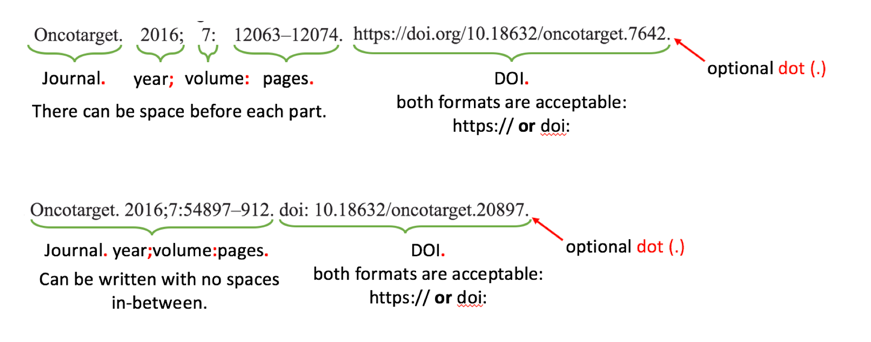
Journal Title. year; volume: page numbers. doi.Example:Oncotarget. 2017; 8:4218–27. http://doi.org/10.18632/oncotarget.13906.Aging (Albany NY). 2015; 7:609-10. doi: 10.18632/aging.100804.Genes Cancer. 2010; 1:1100-14. doi: 10.1177/1947601910396213.Oncoscience. 2016; 3:58-70. https://doi.org/10.18632/oncoscience.292.
8.2.3. Check the format of each element:
- Journal title should be followed by period (.). There should be a space after period.
- Year should be presented in full (4 digits) and should be followed by semicolon (;). There can be a space after semicolon (not mandatory, but consistency should be maintained).
- Volume should be one or more digits and should be followed by colon (:). There can be a space after colon (but this is not mandatory).
- Page numbers can be in either in short (12063-74) of full (12063-12074) format and should be followed by period (.). There should be a space after period.
- DOI should be present and it should not contain spaces. There are 2 allowed formats of doi:
https://doi.org/ … (e.g. https://doi.org/10.18632/oncoscience.292.)doi: … (e.g. doi: 10.1177/1947601910396213.)
- DOI can be followed by period (but this is not mandatory).
If doi is missing, then you should chose doi format for corrections based on the format of other doi present in the article. I.e. the format of doi should be consistent across all the references in the article.
8.3. Citation Data (other journals)
Attention
This section is applicable to all journals except for in-house journals.
Citation data is a part of a reference, which contains Journal Title, year, volume, pages and doi.
8.3.1. Check that citation data has the following elements in the following order:
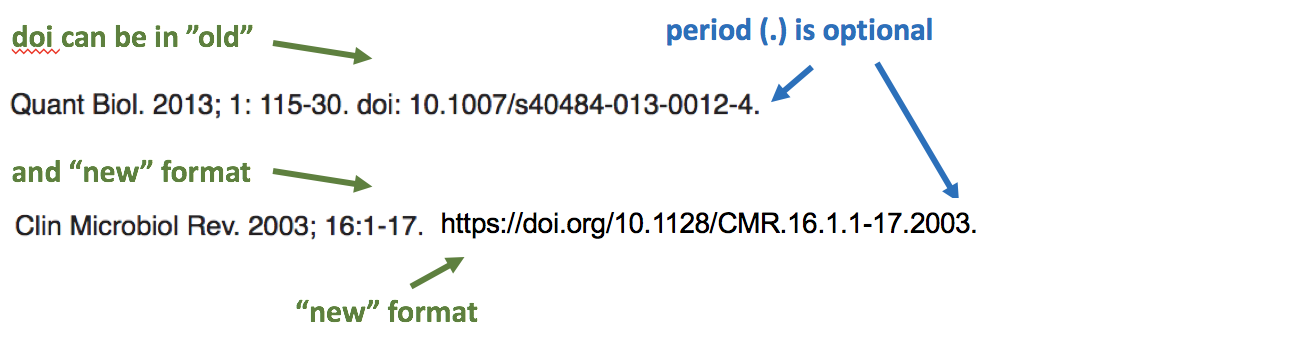
Journal Title. year; volume: page numbers. doi. (note: doi is optional)Example:International Journal of Cancer. 2005; 115:503–510Clin Microbiol Rev. 2003; 16:1-17. https://doi.org/10.1128/CMR.16.1.1-17.2003.Quant Biol. 2013; 1: 115-30. doi: 10.1007/s40484-013-0012-4.
8.3.2. Check the format of each element:
- Journal title can be abbreviated or written in full. If abbreviated, check that it is written the same way as on PubMed site. You can look up journal titles here: https://www.ncbi.nlm.nih.gov/nlmcatalog/journals
- If both full and abbreviated title are present in the reference, then delete abbreviation and leave full title. You can spot such cases by presence of colon (:) in the title (e.g. Rapid Communications in Mass Spectrometry : RCM).

- Journal tile should be in a title case.
- Journal title should be followed by period (.). There should be a space after period.

- Year should be presented in full (4 digits) and should be followed by semicolon (;). There can be a space after semicolon (but this is not mandatory).

- Volume should be one or more digits (rarely can also contain letters) and should be followed by colon (:). There can be a space after colon (but this is not mandatory).

- Page numbers can be either in short (12063-74) of full (12063-12074) format and rarely can also contain letters. Page numbers should be followed by period (.). There should be a space after period.
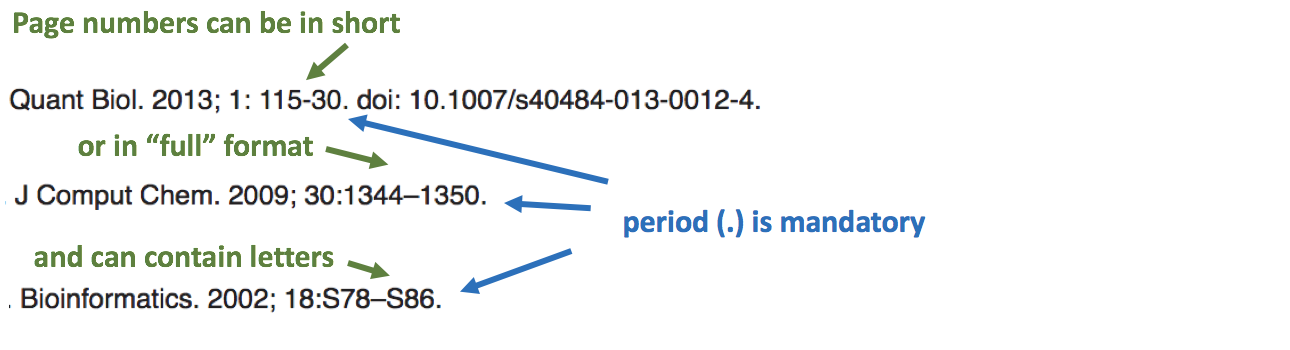
- DOI should be present and it should not contain spaces. There are 2 allowed formats of doi:
https://doi.org/ … (e.g. https://doi.org/10.18632/oncoscience.292.)doi: … (e.g. doi: 10.1177/1947601910396213.)
- DOI can be followed by period (but this is not mandatory).
9. Reference Callouts
9.1. Check reference callouts in the text:
- Check the format of reference callouts:
[N] (where N is the order number of the corresponding reference)Examples:[1][1, 2][1–3][1, 3–4]
- Check that only comma (,) and en dash (-) are used as a separators. No other separators are allowed.
- Check that there is a space after comma (,) and no space before and after en dash (-).
- Check that reference callouts are in plain text.
9.2. Check that callout number for each of the references is present in the text or is covered in the range of numbers. I.e. in the range of [1-3] reference 2 is not present in the text, but covered in the range. This is acceptable case.
9.3. Check that there are no “orphaned” callouts (i.e. callout numbers for the references which do not exist). E.g. if you see callout [8] and there are only 7 references in the article, then callout [8] is “orphaned” and should be removed.
10. Figure
There can be just one figure in the Editorial/News paper.
10.1. Check that figure image has text and graphics which are clear and large enough to read (i.e. image text is not smaller than article text itself).
If image is hard to read, please contact Production team and ask to provide more clear images. If Production team does not have better images, then contact corresponding author.
10.2. Check whether figure has panel letters. Both lower case and upper case panel letters are allowed. However, they should be used consistently: either all figure panels have lower case letters or all have upper case letters. Mix of formats is not allowed.
10.3. Check the figure description text (figure legend):
- Check that figure legend has a figure number:
Figure N: (where N is a number of the figure)
- Check that number is followed by colon (:).
- Check that figure number is formatted in bold and coloured in black.
- If figure number is followed by text, then check that the first sentence of that text is formatted in bold and coloured in black. The rest of the text should be in plain text.
Figure 1: First sentence of legend text in sentence case. Second sentance and rest of text.
Exclusion: if first sentence contains pannel letters, then it should be formatted in plain text.
Figure 2: First sentence of legend text containing panel letter (A) and letter (B) in a sentence case. Second sentance and rest of text.
Screenshot at Jan 20 12-53-31

- If figure image has panel letters, then check that reference to each panel is present in figure legend. Reference is denoted by panel letter and is formatted in bold.
There are 2 allowed formats for the panel reference (case of letter should match letter case in figure image):A. or a. - i.e. letter followed by period (.)(A) or (a) - i.e. letter wrapped in round brackets ()Panel letters can be combined in different ways in the figure legend text:A. and B. A., B.
 A.-C.
A.-C. (A and B)
 (A, B)
 (A-C)
(A-C)
Same variations are allowed for lower case panel letters.
If a reference to panel letter is missing, then please ask author to provide one.
10.4. Check figure callouts in the text:
- Check the format of figure callouts:
Figure 1 If figure has panels, then callout can have a letter (letter case should be the same as on figure image):Figure 1AFigure 1a
 Examples of callout combinations:Figure 1Figure 1AFigure 1B and 1C (note that there is no “s” at the end of “Figure” word)Figure 1B, 1CFigure 1B–1C
- Check that figure has at least 1 callout in the text. If callouts are missing in the text, please contact author.
11. Tables
There can be just one table in the Editorial/News paper. If you see more than 2 tables, please check with Production Team.
12.1. Check that table font size is large enough to read.
If table is hard to read, please contact Production team and ask to increase font size.
12.2. Check table title:
- Check that there is a title above the table.
- Check that title has table number:
Table N: (where N is a number of the table)
- Check that number is followed by colon (:).
- Check that table number is formatted in bold and coloured in black.
- Check that table number is followed by table title. Table title should be a single sentence. It is not allowed to have more than 1 sentence as a table title.
Table 1: Table title in a sentence case
- Check that title does not have period (.) at the end.
- Check that title is written in sentence case, formatted in bold and coloured in black.

12.3. Check that table-related additional information is presented below the table as a note in plain text.

12.4. Check that table font, title font and notes (additional information) fonts are used consistently within the article (i.e. font should not vary from table to table).
12.5. Check the format of table callouts in the text:
Table 1
- Check that table has at least 1 callout in the text. If callouts are missing in the text, please contact author.